
What to Prepare Before Creating an Account
Have your details ready before opening the form, and registration at Spindog Casino should take under three minutes. UK players need to be 18 or older to register and play for real money. Age and identity verification is needed before you can withdraw, so having your documents ready from day one means no hold-ups when you actually want to cash out.

What you will need: a working email address, a password you have not used elsewhere, your full legal name as it reads on your ID, your date of birth, your UK home address, and your payment method of choice. Crypto deposits carry a lower minimum at £20 compared to £25 for most card and e-wallet options, so it is worth deciding that upfront before you get to the cashier.
Step by Step Spindog Registration Process
The Spindog Casino registration moves through three stages: account creation, identity check, and first deposit. None of them take long. The welcome bonus activates automatically on your first qualifying deposit once the account is confirmed.
- Go to the official site
Open our platform in your browser on desktop or mobile and click the Register button in the top-right corner of the homepage.

- Click the Register button
The registration form opens immediately. Fill in your personal details, set your login credentials, and tick the consent boxes before submitting.
- Complete registration steps
Confirm your email via the link sent to your inbox, then upload your ID and proof of address through the Account Verification section to activate full withdrawal access.


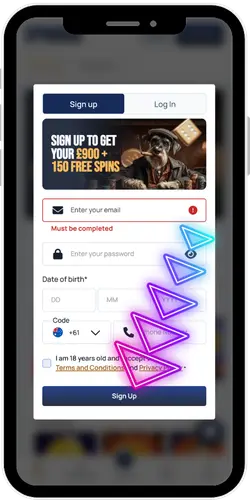
Email confirmed — your account is live and you can put in your first deposit. The Spindog registration welcome package fires automatically on that qualifying deposit. Full withdrawal access needs KYC to be done first; run it through the Account section and most verifications clear within 24 hours.
Entering Personal Details Correctly
The Spindog registration personal details section asks for your full legal name, date of birth, and home address. Everything needs to match your identity documents exactly. A name or address that does not line up with your ID is the most common reason KYC takes longer than it should. An extra minute now saves a longer one later.
- Full legal name: Enter your name exactly as it appears on your passport or driving licence, including middle names if they are on the document.
- Date of birth: Day, month, year in the format the form requests; must confirm you are 18 or older to proceed.
- Residential address: Use your current UK address; this is the address that will be cross-checked against your proof of address document during KYC.
- Phone number: UK mobile number recommended; used for two-factor authentication and account recovery if needed.
- Currency: GBP is the default for UK accounts; set at registration and cannot be changed after the account is created.
Made a mistake in one of these fields after registering? Get onto our live chat team. Some things can be corrected with document support; others lock in once your account is verified, so it is better to flag it sooner.
Setting Login Details for Account Access
Your email and password get you in every time. Both are set during registration and both are case-sensitive from that point on. A strong, unique password takes a few seconds more to choose and significantly cuts the risk of someone else getting in.
| Login Detail | Notes |
| Email address | Must be an address you actively use and can access; used for account recovery and verification emails |
| Password | Minimum length and complexity requirements apply; use a mix of letters, numbers, and symbols; do not reuse passwords from other sites |
| Two-factor authentication | Not required at registration but activatable from account settings post-login; adds a one-time code step to every new device sign-in |
| Stay signed in | Optional setting on personal devices; skips the password entry on future visits; not recommended on shared devices |
Lost access to the email you registered with? Contact our support team before the account locks out. Getting back in without the original email means going through identity verification, which takes longer than a standard password reset. Keeping the email current is the easier option by a long way.
Confirming Terms and Contact Preferences
Before you submit the form, two consent boxes need to be ticked. The first confirms you have read and agreed to the terms and privacy policy. The second is about marketing — promotional emails and notifications. The first is required to proceed. The second is entirely your call and can be switched off at any point from your account notification settings.
| Consent Item | Detail |
| Terms and privacy policy | Required; confirms you accept the terms of use and acknowledge how your personal data is handled |
| Marketing communications | Optional; covers promotional emails, bonus notifications, and platform updates; can be turned off at any time in account settings |
| Age confirmation | Required; you confirm that you are 18 or older and legally permitted to gamble in your jurisdiction |
| Responsible gambling tools | Deposit limits, session reminders, and self-exclusion are accessible from account settings immediately after registration |
Set your deposit limits before you make your first payment. It is in account settings, takes under a minute, and is much easier to do before any balance is sitting there. Reductions go live straight away; increases come with a built-in cooling-off period before they kick in.
Verifying an Account
KYC is required before any withdrawal goes through. The cleanest move after Spindog registration is to submit your documents straight away — it takes the verification step completely out of the withdrawal process. Send everything in readable condition and most accounts clear within 24 hours.
- Photo ID: Valid UK passport or driving licence; must be unexpired, clearly legible, and showing your full name and date of birth.
- Proof of address: A utility bill, bank statement, or official correspondence dated within the last 3 months; must show your full name and current residential address.
- Payment verification: A screenshot or photo of the card or e-wallet used to deposit; for cards, only the last 4 digits need to be visible.
- Source of funds: May be requested for large transactions or if account activity triggers a review; a recent payslip or bank statement is the standard format.
- Document quality: Files should be in focus, well-lit, and submitted in full without cropping; low-quality uploads are the most common reason verification takes longer than 24 hours.
Once KYC clears, it sticks. You will not be asked to go through it again unless your details change or a large transaction triggers a specific review. Players who send documents on registration day consistently report faster first withdrawals than those who leave it until they are ready to cash out.