
How the Spindog Sign In Process Works
Your account is a tap away. The Spindog Casino login button sits top-right on every page of our site, no scrolling needed. On a personal device where you have already ticked stay signed-in, you will not even get to the password field.
- Go to the official site
Open our platform in your browser on desktop, iOS, or Android.

- Click the Login button
Tap the Login button in the top-right corner of the homepage to open the sign-in panel.
- Enter your details and access your account
Type your registered email address and password, then confirm to open the casino lobby.
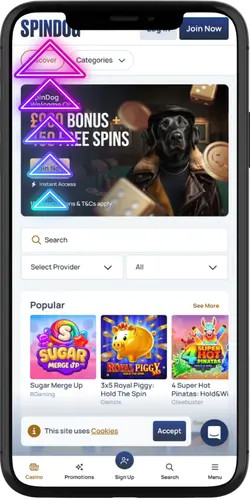
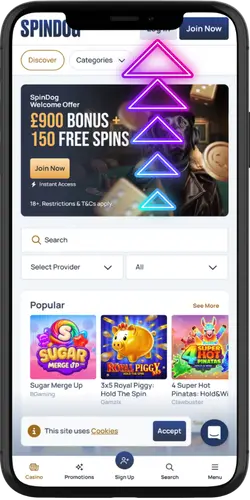
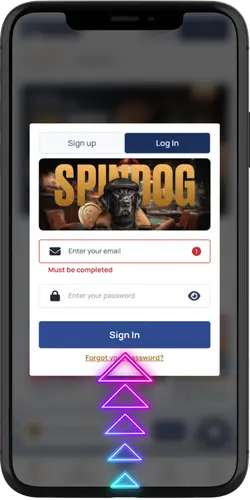
Once you are in, the dashboard puts your balance, active bonuses, and transaction history in one place without clicking anywhere else. Spindog game lobby, cashier, pending withdrawals all one tap from there. Two-factor authentication is in the Security section of your settings and takes under 2 minutes to switch on; if you deposit regularly, it is worth doing.
Details Needed to Access Your Account
Two things get you in: the email you registered with and the password you set at signup. Both are case-sensitive, so a stray capital or a trailing space on a copied address will stop the login cold. Not sure which email you used? Pull up your inbox and search for the original registration confirmation that is the quickest way to settle it.
| Detail | Notes |
| Email address | Must be the exact address used at registration; case-sensitive including any dots, plus signs, or subaddress extensions |
| Password | Case-sensitive; minimum complexity set at registration; must not contain spaces at the start or end |
| Two-factor code | Required if 2FA is active on your account; sent to your registered mobile number; valid for 60 seconds |
| Password reset | On the Forgot Password link on the login screen; reset link sent to your registered email within a few minutes; valid for 15 minutes |
We do not store passwords in a readable format, so there is no way for us to tell you what yours is. The reset link is the only way back in if you have forgotten it. Once you are through, a password manager is worth setting up it beats relying on memory or recycling the same password across multiple accounts.
Common Checks Before Signing In
Most sign-in problems come down to the same few things, and most of them take under two minutes to fix. Run through the list below before reaching out to support and there is a good chance you will not need to.
- Email accuracy: Copy-paste from your original registration confirmation rather than typing it out; a single character off is the most common reason a Spin Dog Casino login fails first time.
- Caps Lock: Both fields are case-sensitive; one quick glance at Caps Lock before you type saves a failed attempt.
- Reset link timing: Links from Forgot Password are only good for 15 minutes; if yours has gone cold, just request another.
- Account lock: Too many wrong attempts and the account locks; wait 15 minutes and try again and it usually clears on its own.
- 2FA code: One-time codes are valid for 60 seconds; if yours has timed out, wait for the resend option rather than entering an expired code.
- Browser cache: A stale cache can stop the login page loading properly; clear cookies and cache in your browser settings and it usually sorts in under a minute.
Still stuck after all of that? Our live chat team is on around the clock and can pull up your account status directly. Most access issues get sorted in one session without documents or an email back-and-forth.
Password and Username Accuracy
Most Spindog Casino login failures start with a credential issue that is easy to overlook. An extra space, a forgotten capital, a password from before the last reset these account for the bulk of failed attempts. A quick check before you try again is usually all it takes.
- Copy rather than type: Paste your email from the original registration confirmation; manual typing is where most errors creep in.
- Password history: A recent reset means the old password no longer works; use only the most recent version.
- Trailing spaces: Mobile autofill sometimes drops a space at the end of a pasted password; delete it before hitting confirm.
- Spam folder: The reset link email occasionally lands in spam; if it has not shown up within 5 minutes, check there before requesting a new one.
- Browser autofill: Saved credentials go stale when you change your password; update the saved version or type it in manually to be sure.
If you have tried the reset process and are still locked out, contact our live chat team directly. We can verify your identity through your account details and help restore access. We cannot send passwords in chat for security reasons, but we can walk you through the reset process step by step.
Browser and Device Compatibility
No download, no plugin the platform runs straight through your browser on desktop and mobile. The Spin Dog Casino login page works across all major browsers and fits whatever screen you are on. If something looks off, updating your browser is the first thing worth trying before anything else.
| Browser / Device | Compatibility |
| Chrome on Android | Fully supported; minimum version Chrome 90+ |
| Safari on iOS | Fully supported; minimum iOS 13 and Safari 14+ |
| Chrome on desktop | Fully supported across Windows and macOS |
| Firefox on desktop | Fully supported; latest two versions recommended |
| Edge on desktop | Fully supported on Windows 10 and 11 |
| Older browser versions | May experience display or loading issues; update to the current version to resolve |
Slow loading or something not rendering right? Clear your browser cache and cookies first it is the quickest fix in most cases. On mobile, closing background apps before opening the platform can make a difference on older or lower-spec devices. If it only happens in one browser and not another, that tells you the problem is on the browser side rather than the platform.
Location and UK Account Access
UK players have full access and we do not block UK IP addresses. If you are travelling and hitting access problems, some countries restrict gambling platforms at the network level and there is nothing we can do about that from our end. A trusted private connection tends to work better than a public hotspot in those situations. Back in the UK and still having trouble? Switch from Wi-Fi to mobile data and see if that clears it a quick way to tell whether the issue is with your network rather than the platform.
Help Options for Spindog Login Problems
Most access problems sort themselves out with the self-service tools on the login screen. Anything that does not, our support channels are there around the clock.
- Forgot Password link: Right there on the login screen; a reset link hits your registered email within a few minutes and stays valid for 15 minutes.
- Live chat: On 24/7 from our site; picks up in under 2 minutes at peak times; can check your account status directly and work through any access issue with you on the spot.
- Email support: Better for anything that needs documents or a longer written exchange; we get back within a few hours, 24 hours at the outside.
- Account security hold: Think someone has been in your account without your say-so? Contact live chat straight away. We can freeze the account within minutes to stop anything further while we look into it.
- 2FA reset: Lost access to the mobile number tied to your 2FA? Contact support. Identity verification is required before the method can be swapped out.
If something cannot be sorted through our support channels, escalation to the authority under our gaming licence is an option that is open to you. That said, coming to us first is always quicker most things get resolved without needing to go that far.